Athenos: A Futuristic Display Font for Bold and Creative Design
When it comes to typography, the right font can make or break a design. Athenos is a display font that stands out with its futuristic character shapes and dynamic style. Designed to capture attention, it’s an excellent choice for logos, movie posters, flyers, social media posts, and more. Whether you're a beginner or a professional designer, understanding how to use Athenos effectively can elevate your projects and help you stand out in a crowded digital space.
What Is Athenos and Why It Matters
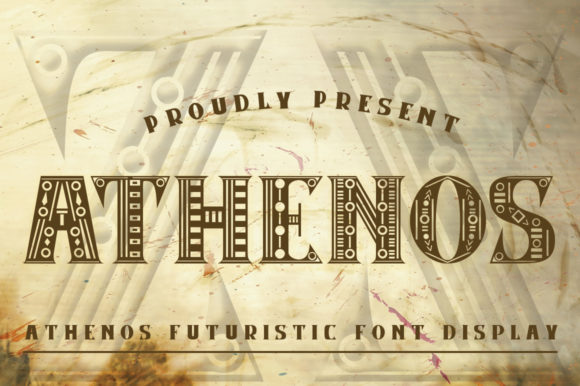
Athenos is a modern display font known for its clean lines, geometric shapes, and bold presence. Its unique structure gives it a futuristic feel that blends well with contemporary themes. This font isn't just about aesthetics; it's also about functionality. It’s designed to be readable even at larger sizes, making it ideal for headlines and visual elements that need to grab attention quickly.
Many designers are drawn to Athenos because of its versatility. It works well across various mediums, from print to digital, and can be adapted to different color schemes and backgrounds. However, some may overlook important details when choosing this font, which can impact the final result.
Common Mistakes When Using Athenos
While Athenos is a powerful tool, there are common mistakes that can lead to suboptimal results. Here are some pitfalls to avoid:
- Using it for body text: Athenos is a display font, not a sans-serif or serif font meant for long paragraphs. Using it for body text can cause eye strain and reduce readability.
- Ignoring spacing and kerning: Because of its unique shapes, proper spacing between letters is crucial. Failing to adjust kerning can make the text look cluttered or unbalanced.
- Overusing it: While Athenos is eye-catching, using it too frequently on a single page can overwhelm the viewer and dilute its impact.
- Mismatching with other fonts: Pairing Athenos with incompatible fonts can create a jarring visual experience. It's best to pair it with simpler, complementary fonts for contrast.
How These Mistakes Affect Your Design
Each of these errors can have a direct effect on your design outcome. For example, using Athenos for body text might make your content harder to read, especially on mobile devices where screen space is limited. Poor spacing can also affect the professionalism of your work, making it appear careless or unpolished.
Overusing the font can lead to visual fatigue, reducing the effectiveness of your message. Similarly, mismatched fonts can confuse viewers and disrupt the overall aesthetic of your project. These issues can ultimately impact user engagement, brand perception, and even conversion rates if you're working on marketing materials.
Practical Tips for Better Results
To ensure that Athenos enhances rather than hinders your designs, consider the following tips:
- Use it for headings and titles only: Reserve Athenos for headlines, banners, and other prominent elements. Let it shine without overcomplicating the layout.
- Adjust spacing carefully: Take time to tweak the letter spacing and kerning. Many design tools offer auto-kerning features, but manual adjustments often yield better results.
- Limit its usage: Use Athenos sparingly. One or two instances per page are usually enough to maintain visual balance.
- Pair it wisely: Combine Athenos with fonts like Helvetica or Roboto for a clean, modern look. Avoid pairing it with similarly bold or decorative fonts.
What to Check Before Choosing Athenos
Before committing to Athenos, take a moment to evaluate whether it's the right fit for your project. Consider the following factors:
- Project purpose: Is Athenos suitable for your intended use? If you're designing a logo, it might be perfect. But for a formal document, it might not be the best choice.
- Target audience: Think about who will be viewing your design. Athenos has a strong, futuristic vibe that may appeal more to younger audiences or tech-savvy users.
- License agreement: Ensure you understand the licensing terms before downloading or purchasing Athenos. Some fonts require attribution or have restrictions on commercial use.
- Compatibility: Test the font across different platforms and devices to ensure it displays correctly. Some fonts may render differently on Windows versus macOS or mobile devices.
Real-World Examples of Athenos in Action
Imagine creating a promotional poster for a new tech startup. Using Athenos for the headline “Innovate Tomorrow” immediately conveys a sense of progress and forward-thinking. Pair it with a clean sans-serif font for the supporting text, and you have a visually striking and effective design.
Another example could be a social media post for a film festival. The title “Cinematic Visions” in Athenos adds drama and intrigue, drawing users’ eyes and encouraging them to engage with the content.
In both cases, the key is to let Athenos serve as a focal point while keeping the rest of the design simple and functional.
Conclusion
Athenos is a versatile and stylish display font that can add a futuristic flair to any design. By understanding its strengths and limitations, you can use it effectively to enhance your creative projects. Avoid common mistakes like using it for body text or ignoring spacing, and always check compatibility and licensing before using it in a professional setting.
With the right approach, Athenos can become a valuable asset in your design toolkit, helping you create visuals that are both stunning and meaningful.